%%{init: {"flowchart": {"htmlLabels": false, "padding": 14}, "themeVariables": {"fontSize": "20px", "fontFamily": "Inter, sans-serif"}}}%%
flowchart LR
  A["Pick a task"] --> B["Plan first"] --> C["Build small"]
  C -- "done?" --> E["Write a<br/>handoff note"] --> F["/clear"] --> A
Virtual Icechunk · IOOS Hackathon 2026
Working with an agent
The agent does the typing; you make the decisions
Eli Holmes1
1NOAA Fisheries
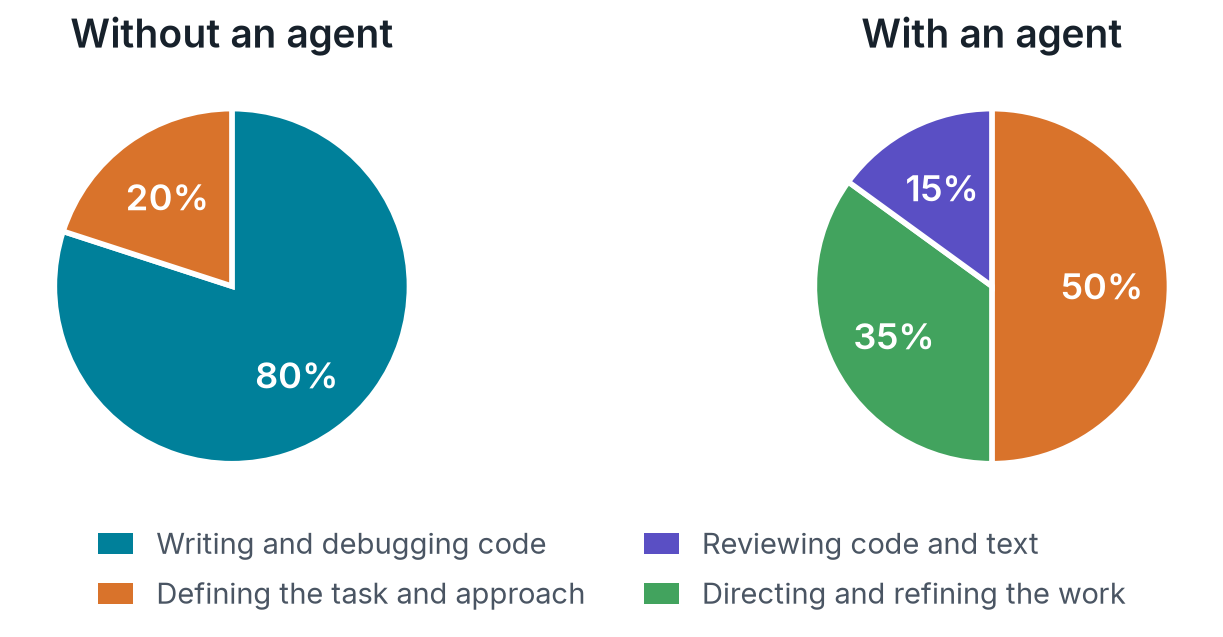
From writing the code to directing the work
An agent is not a chatbot
- It reads your files, runs commands and writes code in the folder you start it from
- It asks before it does anything risky. Read the request before you say yes
- It works in your name, with your subscription and your GitHub login
Treat it like a fast, well-read collaborator who is new to your project. Give it clear tasks, and check its work.
One task, one session, one handoff
A task has a boundary
| A task | Not a task |
|---|---|
| “Check whether these HYCOM files allow byte-range reads” | “Help me with Icechunk” |
| “Write a plan for a virtual store of the NDVI files” | “Let’s work on the data” |
| “Make the smoke-test notebook read real values” | “Make everything better” |
| “Explain why this store shows axes but no data” | “Tell me about Zarr” |
Plan first, build small
- Ask for a plan before any code. Claude Code has a plan mode (Shift+Tab) that stops it from changing files while it plans
- Read the plan. That is where your science knowledge matters most
- Build one small piece at a time: one notebook, a few files, one check. Small pieces are easy to review, and cheap to redo
Close the loop
When a task is done, or you are switching tasks, or the session is getting long:
- “I am about to clear. Write what we did and what’s next to
notes/handoff.md.” - Type
/clear - Start the next task with “Read
notes/handoff.mdand continue.”
Long conversations cost you three ways: they use up your subscription faster, the agent loses focus, and a crash loses everything since the last note.
Skills
What a skill is
- A folder of instructions (
SKILL.mdplus reference files) that teaches the agent how to do one kind of job - The agent reads every installed skill’s one-paragraph description at the start of a session
- When your request matches, it loads the skill and follows it
You do not call a skill. Describe the task in plain language, and the agent picks the skill. To ask for one directly, type /virtual-icechunk (in Codex, $virtual-icechunk).
ocean-icechunks-skills
| Skill | Use it to |
|---|---|
| virtual-icechunk | Research, build, validate, document and audit virtual Icechunk stores of NetCDF/HDF5 files |
| archive-to-cloud | Copy a provider’s files, unchanged, to object storage first, when they are not somewhere a store can reference |
Both were written from lessons learned on real ocean-data builds, and they work with Claude Code, Codex, Copilot and Antigravity.
Install them: Start your coding agent → Add the ocean-icechunks skills
The skill builds in a set order
%%{init: {"flowchart": {"htmlLabels": false, "padding": 14}, "themeVariables": {"fontSize": "20px", "fontFamily": "Inter, sans-serif"}}}%%
flowchart LR
  A["1 · Research<br/>and plan"] --> B["2 · Smoke-test<br/>notebook"] --> C["3 · Production<br/>build"] --> D["4 · README and<br/>loading example"]
- It stops for your review between steps. Expect questions and a plan before any build code
- The smoke test writes to a local store and must read real data back
- Credentials never go in a notebook, and tests never touch a production store
Prompts that work
I want a virtual Icechunk store for the NOAA CDR NDVI files in
s3://noaa-cdr-ndvi-pds. Research the files and write a plan before any code.

Does this THREDDS server expose the real NetCDF files, or only OPeNDAP?

Write a smoke-test notebook that builds a small store from three of these
files and reads real data back.

The smoke test passed. Turn it into a production build script.

Write the README and a loading example for this store.

Why is this store so slow to open?
You are still the scientist
- Check the numbers. Do the values, units and dates make sense for this dataset?
- Ask why. “Why did you drop that variable?” “What did you assume about the time axis?”
- Stop it when it goes in circles. A build that keeps failing gets more expensive, not more likely to work
Report a lesson back
A skill only knows what someone has written into it. When a build teaches you something:
- Ask: “What did this build teach that the virtual-icechunk skill should know?”
- Write it down in your project’s notes, with the evidence
- Open an Update skill issue
Try it
In a terminal on the hub:
Then ask: “Research the NOAA CDR NDVI files for January 2000 in s3://noaa-cdr-ndvi-pds and write a plan for a virtual Icechunk store. No code yet.”
Next: the basic pipeline
⌂ Home · Working with an agent