Virtual Icechunk · IOOS Hackathon 2026

Why virtual Icechunk?

Deliver a product, not a pile of files

Eli Holmes1
1NOAA Fisheries

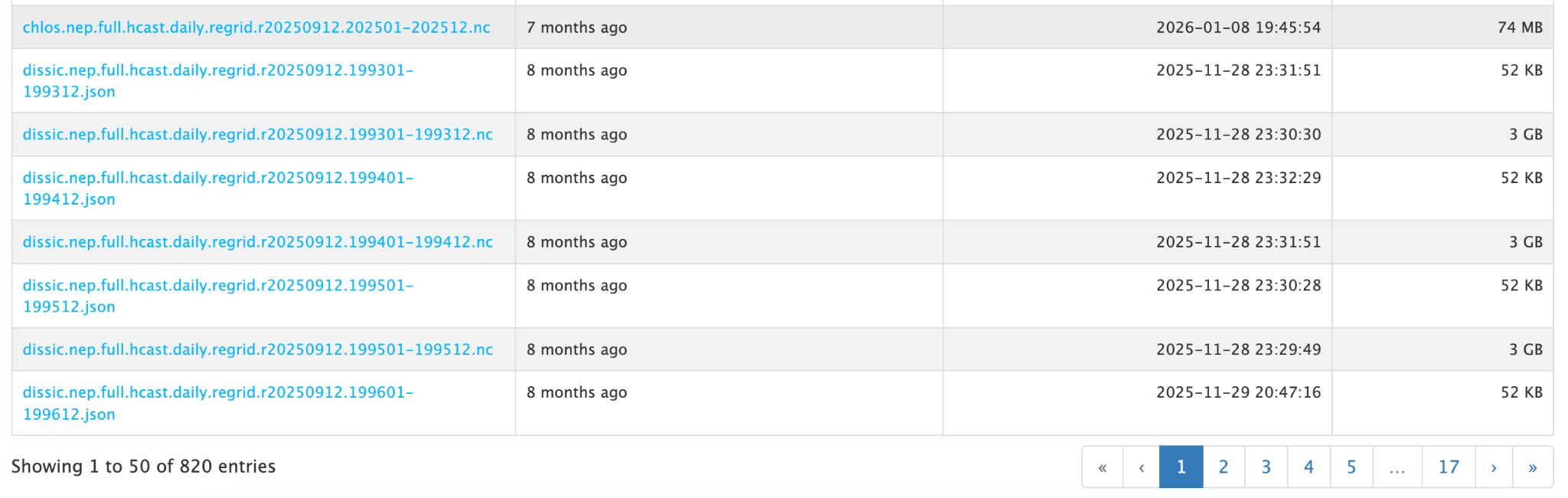
So many NetCDF files

A file listing showing NetCDF and JSON files named by variable and year, 'Showing 1 to 50 of 820 entries'

CEFI MOM6 Northeast Pacific hindcast on the PSL THREDDS server: page 1 of 17.

820 files, from one model, one hindcast, one region, and one release.

Users want a product, not a pile of files
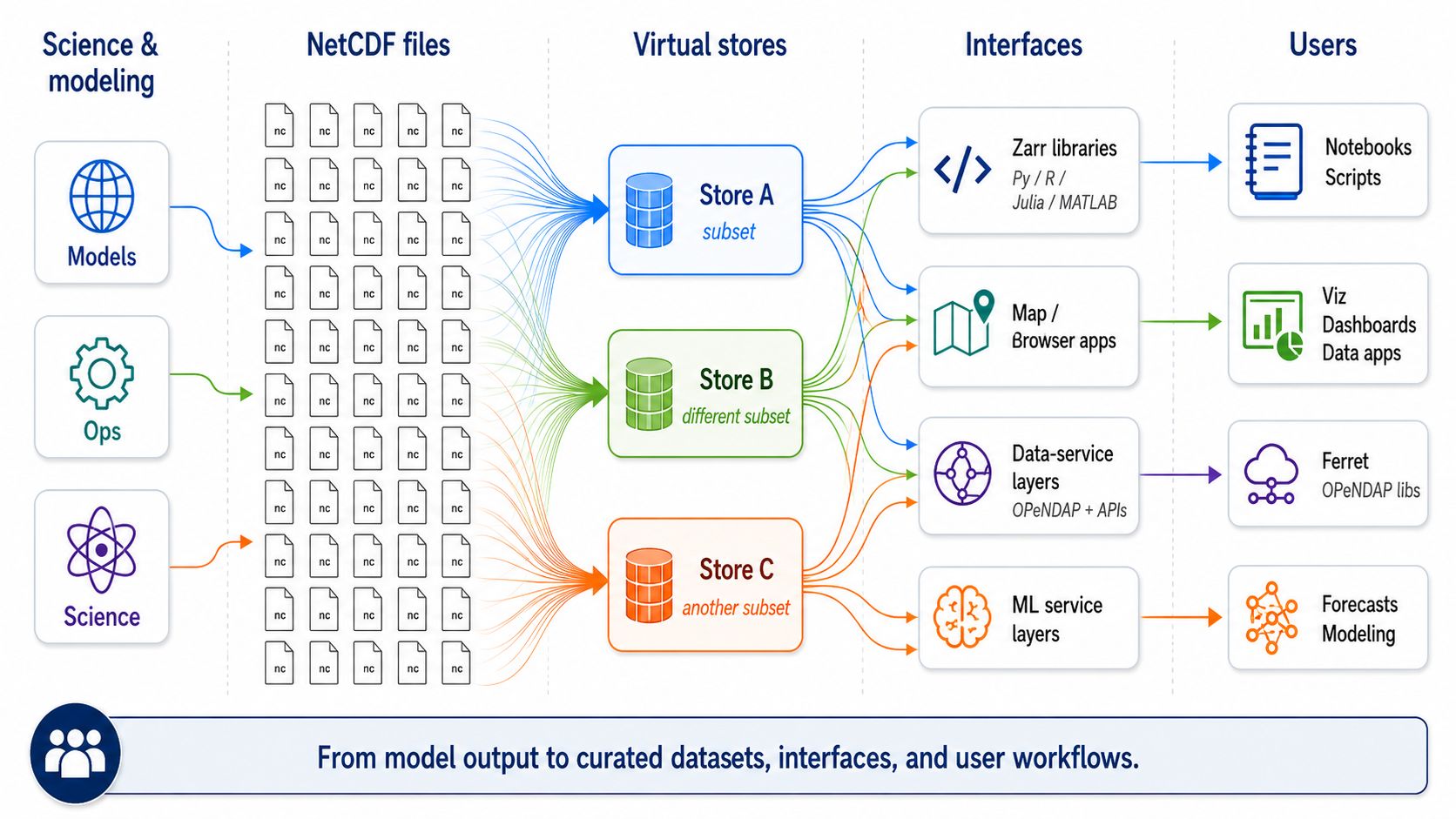
Diagram: models, ops and science write NetCDF files; virtual stores A, B and C each reference a subset; Zarr libraries, browser apps, OPeNDAP and ML services read the stores; notebooks, dashboards and forecasts use them

Why not just download the files, or use THREDDS?

Downloading

  • Gigabytes to get the one slice you need
  • Copies on every laptop, all out of date
  • Hours of scripting before any science

Data servers

  • Cap large requests (PSL THREDDS: 500 MB each)
  • Fail under load (“NetCDF: DAP failure”)

Object storage (S3, Google Cloud, Azure)

  • Serves byte ranges, not whole files
  • Spreads requests across many machines, so parallel readers do not queue behind each other
  • In practice, as many connections as you can throw at it

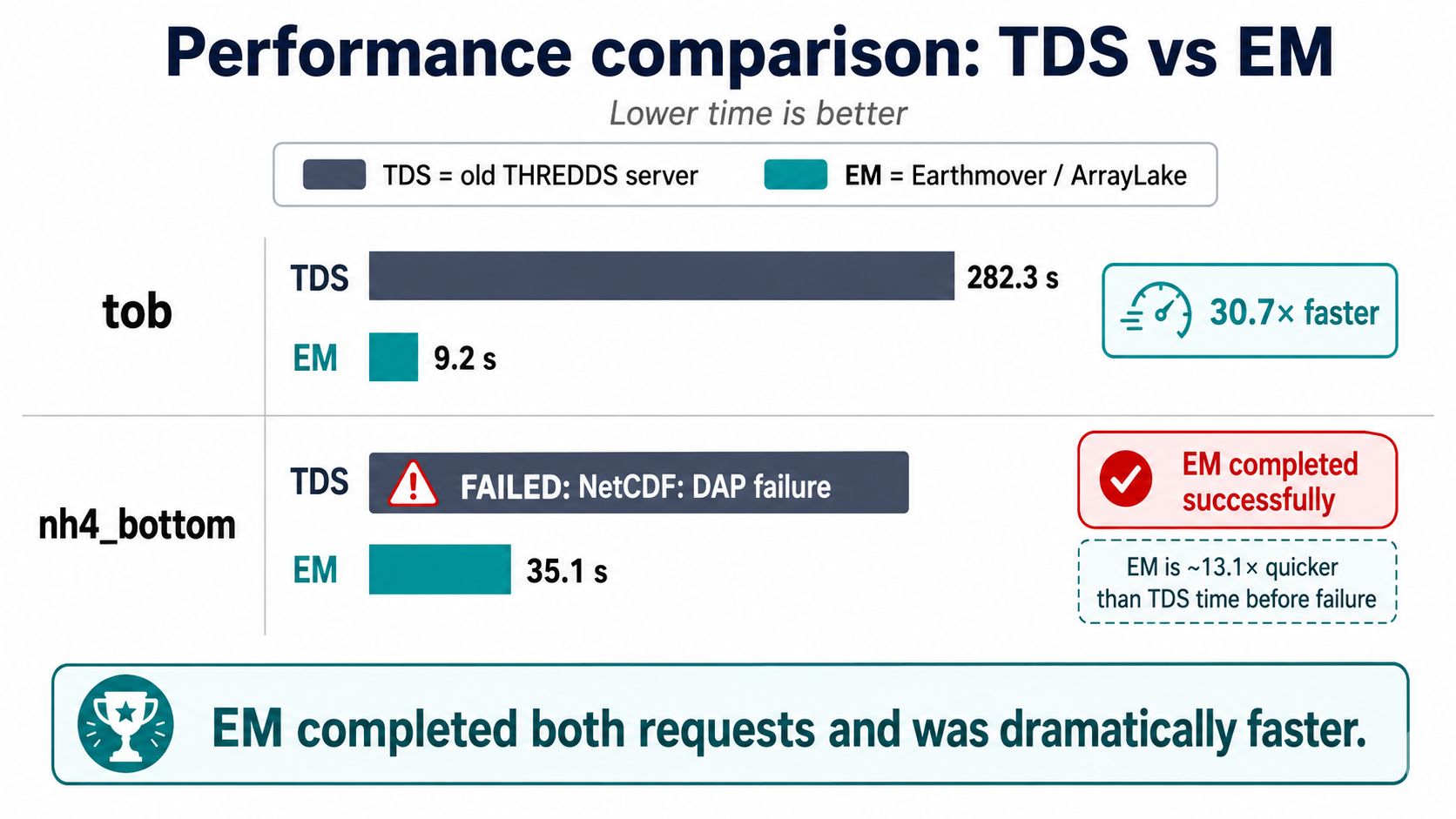
From minutes to seconds

Bar chart: tob took 282.3 s from THREDDS and 9.2 s from Arraylake, 30.7 times faster; nh4_bottom failed on THREDDS and took 35.1 s from Arraylake

Resampling a 2-D CEFI MOM6 NEP variable: THREDDS vs. a virtual store in Earthmover Arraylake. Holmes, ESIP, July 2026.

Let’s see this in action

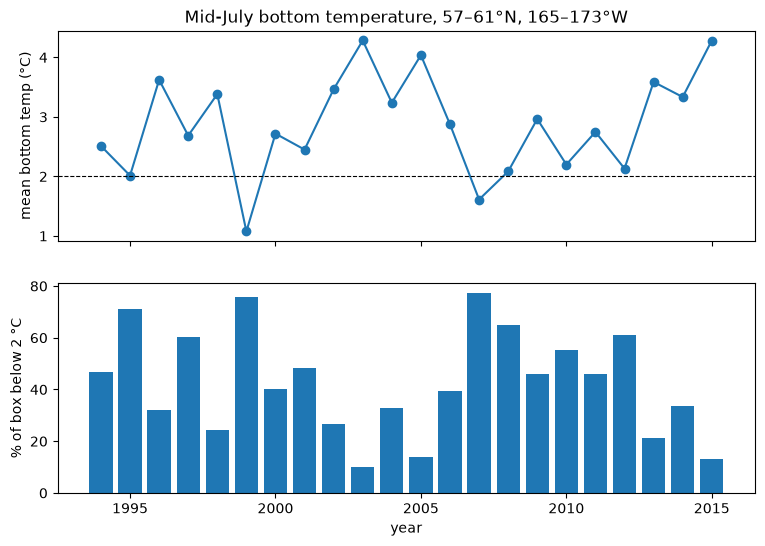
Bering Sea snow crab, 1994–2015

306 TB of HYCOM reanalysis · opens in ~1 s · nothing downloaded
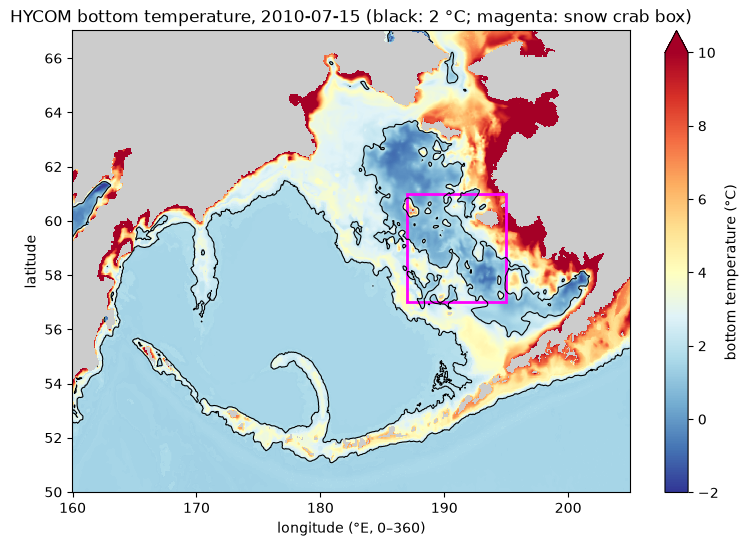
Map of HYCOM bottom temperature in the Bering Sea on 15 July 2010, with the 2 degree C cold pool outlined and the snow crab box in magenta

Mid-July mean bottom temperature in the snow crab box and the percent of the box below 2 degrees C, each year 1994 to 2015

Open in Colab →

VirtualiZarr: no reprocessing

  • Keep the data as it is. The NetCDF files stay where the provider put them.
  • Build a catalog of chunks. For every chunk: which file, at what byte offset, and how long.
  • Save the catalog as one Zarr dataset. Readers open that, and read the bytes straight from the original files.

If the files are compatible (the same grid, chunking and encoding), there is nothing to rewrite.

Why Icechunk, not Kerchunk?

Kerchunk made virtual datasets possible. Icechunk makes them safe to share and keep up to date.

  • Transactions. Commits are atomic, with snapshots and rollback. Kerchunk references are plain JSON or Parquet files that anyone can overwrite.
  • Safe appends. New files are added in a commit, and readers never see a half-written store. With Kerchunk you rewrite the references yourself.
  • Zarr-native. The store is a real Zarr store, so any Zarr reader opens it. Kerchunk needs an extra fsspec reference layer.
  • Scale. Chunk manifests are built for huge chunk counts. Very large JSON reference sets are slow to load.
  • Modern I/O. The stack reads through Rust and obstore, not fsspec: more flexible (S3, GCS, Azure, local, HTTP) and fast under many concurrent requests.

Handling forecast model run collections

A forecast model writes a new file every day. Keep every run, not just the latest.

  • Two time dimensions. time is the forecast reference time, one value per file. step is the lead time, the same in every file. Data are (time, step, ...).
  • Append along time. Each new file adds one entry. Nothing is rewritten.
  • Valid time is computed. It is time + step, never stored.
  • Pick a run, or a best estimate. Select one forecast, or stitch the newest hours from every run into one continuous series.

One store holds the whole history of every forecast.

New tools make this much easier

  • VirtualiZarr 2: reads NetCDF/HDF5 metadata and builds the chunk catalog
  • Icechunk 2: stores the catalog, with versions and commits, like git for data
  • Coding agents + ocean-icechunks-skills: plan, build, check and document a store for you

Let’s try it out

Make your own virtual store

5 NOAA NDVI NetCDF files on AWS

303 MB of data, left in place

54 kB Icechunk store

Open in Colab →

Resources

Next: put an agent to work

Chapter 2 · Working with an agent